
My Long-Lost Blogger Blog
By Mike Maddaloni on Thursday, April 25, 2024 at 06:14 AM with 0 comments
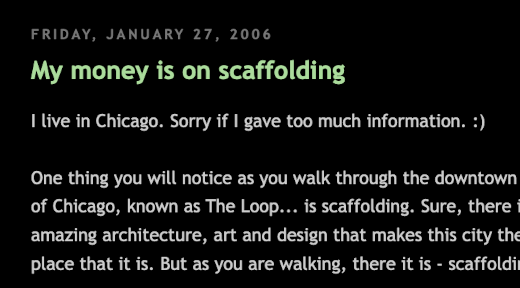
Where last December I wrote about celebrating 17 years of blogging apparently this was not exactly the case. According to an email I got from Big Tech behemoth Google shortly thereafter, in actuality I started blogging much earlier in 2006 than I remembered.
The email in question came from Blogger, a blogging platform Google acquired in the early 2000’s. In the message I was told that my inactive blog would soon be shut down. My what? I had no recollection of a blog at Blogger, so I clicked on the link and lo and behold there it was. At this long-abandoned site there were 2 posts both written on January 27, 2006.
What to do?
What was I to do? Should I keep it? Heck, it’s enough to write for one blog these days, forget two. So I decided to let it lapse but captured the 2 posts below, which I am archiving here. Interestingly they are similar to the early posts I wrote here at The Hot Iron in that they were rather short. These were written in the days before what was then called microblogging and later social media, so they were more concise thoughts rather than something in depth.
Welcome back to early 2006... here are those 2 posts – warts and all – for immortality, at least as long as this blog is here.
Just what we need! – Friday, January 27, 2006, 4:30 pm
When the creator of email, Ray Tomlinson, was asked what was the first email message text he sent, he did not remember. Where just across the river from Tomlinson's MIT lab in Cambridge, MA is the site where around 100 years earlier another professor, a guy named Bell, remembered the first words he said over his new invention, the thing we call the telephone.
So in that same spirit I don't think my very first post in my very first blog will be that memorable either. However I hope that my future posts will make up for it!
My money is on scaffolding – Friday, January 27, 2006, 4:54 pm
I live in Chicago. Sorry if I gave too much information. :)
One thing you will notice as you walk through the downtown section of Chicago, known as The Loop... is scaffolding. Sure, there is the amazing architecture, art and design that makes this city the great place that it is. But as you are walking, there it is - scaffolding.
Of course it is a symbol of growth and regeneration, but it is also a pain. As you are walking the sidewalks, there is a tunnel, blocking your view and passageways as you take in the Windy City.
So if you can't beat them, join them! So does anyone know of any any publicly-traded scaffolding companies?
Deconstructing a Long-Lost Blog
Where in one regard my forgotten Blogger blog was digital residue that needed overdue cleanup, in another it was a serendipitous encounter with the past that people don’t often get – the time I learned of a long-lost Shutterfly account was another. Embrace opportunities such as these, for we don’t know what else we have forgotten or if it will ever come back to us.
This is from The Hot Iron, a journal on business and technology by Mike Maddaloni.
Did you enjoy this? Subscribe to The Hot Iron by RSS/XML feed or Read by Email
Blogging • Diversions • (0) Comments • PermalinkMy Takeaways From TekWar
By Mike Maddaloni on Sunday, March 24, 2024 at 05:49 PM with 0 comments

AI-generated image by DALL-E of someone writing a science fiction story
Not a day goes by when I don’t hear some comical reference to predictions that by 2020 we would have flying cars. Forecasting the future isn’t an exact science, but it can be fun to explore. Today some things are as they were predicted (like watch phones) and others are just not quite there yet (like living on the Moon).
What will life be like 100 years from? Will we finally have flying cars or something even better? Will we still have the societal problems today, will they go away or will be have completely new ones? All of this is explored in the science fiction book TekWar by William Shatner. Yes, the same William Shatner known for his role as Captain Kirk in the original Star Trek series, and beyond.
First published in 1989, TekWar is set in 2120. The hero of the novel is Jake Cardigan, a former police officer who is released from a futuristic prison early to work as a private investigator on a case. “Tek” is a futuristic illegal drug that got Jake in trouble and still plagues society. Where the technology of the time plays a key role in this story, it is the people and interactions with that technology that are core of the story.
But is it possible to have takeaways from the science fiction book? I sure did.
Did Shatner predict social media and print-on-demand books? – At one point in the story there’s mention about someone filming all the bad things in the city, and how it is presented sounded familiar to the livestreaming over social media that many – including myself – have done and continue to do. The concept of books printed on-demand, something that is a thriving business today, was presented in the story as done at the Dalton-Walden American Faxbook Centre (a nod to two now-defunct bookstore chains). Even android robots were able to print books from their abdomen.
The seedy side of life still exists – Where it would be nice to think that 100 years from now – or even in a shorter time period – the underbelly of society was reduced or eliminated. That wasn’t the case in TekWar, and my guess it won’t be when my descendants will be on this mortal coil.
Finally – There are flying cars in Shatner’s 2120, if that’s any comfort to you.
How I Learned About TekWar
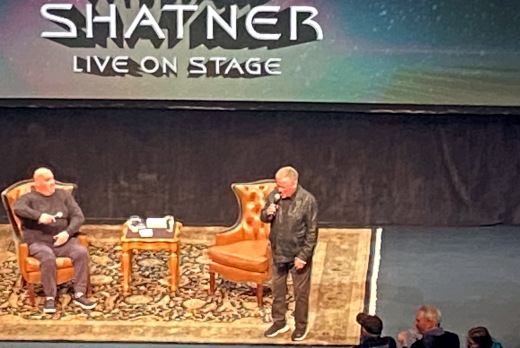
Last Fall William Shatner did a 5-city spoken word tour that kicked-off in none other than Appleton, Wisconsin, the city where I now call home. Why? I have no idea for sure, but the Fox Cities Performing Arts Center was the venue and was filled to about half-capacity for this unique show.
As it was in the midst of the actors and writers strikes, Shatner wasn’t even supposed to acknowledge any specific roles or characters he played by name. After a showing of the Star Trek II: The Wrath of Khan for which he was not “allowed” to even introduce, he took the stage for over 90 minutes of telling stories and answering some audience-submitted questions. At the young age of 92 on the night of the performance, he was not only animated and witty but an inspiration for anyone to be like him at that age, if we make it to that far.
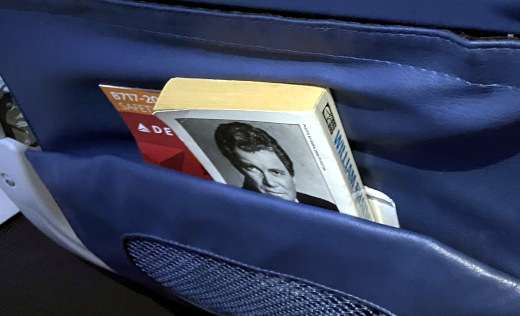
Shatner was, however, able to talk about TekWar during his dialog, the first of a series of science fiction novels he wrote. As I previously was unaware he was a writer (I was aware of his “singing” career, but I digress) I had to get a copy of it. A few days later I bought a copy at a used bookstore not far from the theater I saw him at and brought it with me on a business trip. As I share all books I read, I decided to leave TekWar in the seatback pocket of the flight I was on when I finished reading it. Hopefully someone was able to find it and enjoy reading as I did about the trails, tribulations and travels in the future.
This is from The Hot Iron, a journal on business and technology by Mike Maddaloni.
Did you enjoy this? Subscribe to The Hot Iron by RSS/XML feed or Read by Email
Book Take-Aways • (0) Comments • PermalinkMy Wish: Globally Ungrouping iOS Notification
By Mike Maddaloni on Tuesday, March 12, 2024 at 07:07 PM with 0 comments
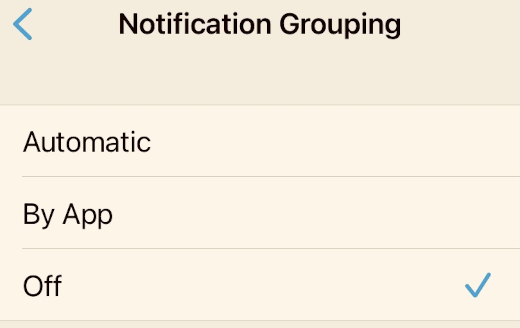
As someone who works in software, I’m often confronted with wishes and change requests from users. Those wanting these features themselves would find them useful; whether or not they would be beneficial to other uses the whole other story. Part of my job is to allow them to have those by working with our developers to make them happen. Or not.
For myself I often have requests for the software I use, which these days is mostly business applications and mobile apps. From my years of experience, I realize making such requests is often a fruitless endeavor. Why? Most likely there’s no channel to make such requests and if there’s a contact it is likely a one-way ticket to an abyss. That being said there’s an issue I have had with iOS, the operating system that powers iPhones, that has been bugging me for years.
My wish is for the option to turn off the default grouping notifications for all apps.
How It Is Now
Whenever you install a new app and first open it you are most always prompted if you’d like to receive notifications from the app. Such notifications are message banner that appear or persist over your home or lock screen. These are for “useful” information from that app - whether an alarm, a bid came through on an auction or whatever. By default, these notifications are grouped by app so they appear “stacked” and you must click on the stack to see each one.
Often I have an issue where sometimes I miss a single notification as there are multiples for an app. To mitigate this, I have to go into Settings and turn off notification grouping every time I install a new app. When I flashed my phone recently due to a power-hogging issue (which resolved it by the way) and manually added each app back rather than using a backup, I had to turn off this grouping for each and every app, which needless to say was a pain in the ass. The accompanying image to this post shows the switch in iOS settings for an individual app.
How It Should Be
I wish there was an option where I (or you or anyone else) could set notification groupings to default to being off for all apps instead of on. Where in the world of Settings on an iPhone would this exist? I’ll leave it to the user interface/user experience (or UI/UX) experts to design. This would make my life so much easier – yes, I am asking for more notifications, not less. Sadly, I rely on the technology to tell me what to do too often, and this is why I surround myself with computers, because aren’t they supposed to make life easier?
Are you with me on this? Or not? Let me know either way in the comments of this post.
Deconstructing Software Features
Productivity is measured in different ways by different people. App notifications help me keep on top of what’s due or next especially at times when there’s too many things going on. Having the ability to easily customize those en masse would be a lot easier than doing them one by one, which is the only current option. I think it’s a valid request. I don’t know if Apple would listen to me, but I have to put it out there in the abyss.
This is from The Hot Iron, a journal on business and technology by Mike Maddaloni.
Did you enjoy this? Subscribe to The Hot Iron by RSS/XML feed or Read by Email
Build • Mobile Technology • (0) Comments • PermalinkMy Takeaways From The Creative Act
By Mike Maddaloni on Wednesday, March 06, 2024 at 06:59 PM with 0 comments

Are you creative? It’s a question that provokes different answers depending on who it is posed to. For some they would definitely have an answer to it, but for others they may wonder why it was asked of them in the first place. I have asked this of myself, someone who’s got his head down into a laptop computer most of his days doing whatever it takes to get through working in software technology. Then I will pull my head out of that laptop and look around me and remind myself that I am indeed creative.
Creativity comes in many forms, not just in output but in the process, or act. This is the theme of The Creative Act: A Way Of Being by Rick Rubin. Rubin is the legendary music producer who co-founded the Def Jam Recordings label and has worked with everyone from the Beastie Boys to Aerosmith to Johnny Cash and many, many others. Known for his eccentricity, last year he published this book of his thoughts on the creative process.
As I read through this unique book, I imagined how it possible came together: Rubin walking around his studio, barefoot, dictating his thoughts to someone following him around. Whether that was the case or not, his thoughts are presented in a unique way – there are dozens of “chapters” with some ranging from a couple of pages to more, but none too long. As I read through the book I was certainly inspired and had over a dozen significant takeaways, however I decided to refine the list to the following.
We all are artists – A pervasive theme throughout the book is that we are all artists. Often we think of artists as painters, photographers, writers, musicians... people who create things that are considered under the relatively rigid category of “art.” Often I sit back and look at a business or technical solution I have worked on for whatever time and even impress myself, finding a creative way to get from where I and my team are to where we want to be. Where nobody would be clamoring to have my work products from it framed and hung in a gallery, they have been deemed creative by others, so I would consider them art. I also consider myself creative with my time in improv and the writings here at this humble blog as ample examples.
Agile as art? – When I say “agile” I am referring to the philosophy/methods/approach/mindset of incrementally developing software and other products, often identified by frameworks such as Scrum and Kanban. With a goal in mind, a team of people are creating something, not necessarily knowing exactly what that finished product will look like. Where those on the team may not consider themselves artists or creative (nor others outside of a team looking at a bunch of business and tech types) this is not to say there is creativity and artistry in their work and process.
Ideas come from the outside, not the inside – This is an ethereal concept, where Rubin professes that ideas are out there, in the wild, and we recognize them and work with them. I’m not sure I completely agree with it, but he makes compelling points towards it. Perhaps the inspirations I would get when I walked along Lake Michigan in Chicago actually were in the air... along with the gnats buzzing around the shoreline?
Crafting – Rubin talks of how Andy Warhol did a lot of crafting, where he created an idea and had other artists execute on it. This triggered a pleasant flashback to 2006 when the Cloud Gate sculpture in Chicago’s Millennium Park was formally dedicated which I attended. During his speech the artist who created/crafted the artwork affectionately known as The Bean, Anish Kapoor, was repeatedly thanking the company Performance Structures, Inc. who took his idea and plans and actually built it. I just so happened to be in the crowd standing next to the president of the company, who was simultaneously blushing and beaming at the attention from Kapoor as he was pointing in our direction.
What is success to you? – Where many quotes from the book stirred something in me, this was especially did:
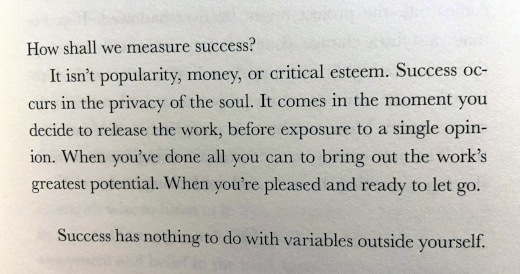
The quote reads as follows:
“How shall we measure success?
It isn't popularity, money, or critical esteem. Success occurs in the privacy of the soul. It comes in the moment you decide to release the work, before exposure to a single opinion. When you've done all you can to bring out the work's greatest potential. When you're pleased and ready to let go.
Success has nothing to do with variables outside yourself.”
When I have true success, I have felt this way. Do you agree?
“Comparison is the thief of joy” – This is a quote from the 26th US President Theodore Roosevelt, which is fitting from an individual there was really no comparison to in his lifetime.
I first learned of The Creative Act when I saw this video of Rick Rubin being interviewed by Anderson Cooper for 60 Minutes which is embedded below.
From my days in college radio I remember seeing Rubin’s name as the producer of many albums that came into the radio station. So last summer when on vacation and stopped into a locally-owned bookstore in northern Wisconsin and I saw the book in their collection, I had to buy it. I enjoyed it thoroughly, both in its format and collection of wisdom from a true modern guru. This is a book I recommend to everyone, whether you think you are creative or not (and if not, it may sway you). The destination for the giveaway of this book is a colleague and mentor who I feel is very creative in how he consults and educates... and I am pretty sure he concurs with my opinion.
This is from The Hot Iron, a journal on business and technology by Mike Maddaloni.
Did you enjoy this? Subscribe to The Hot Iron by RSS/XML feed or Read by Email
Book Take-Aways • (0) Comments • PermalinkWhy I Got A Certificate In Mentoring
By Mike Maddaloni on Tuesday, February 20, 2024 at 02:15 PM with 0 comments
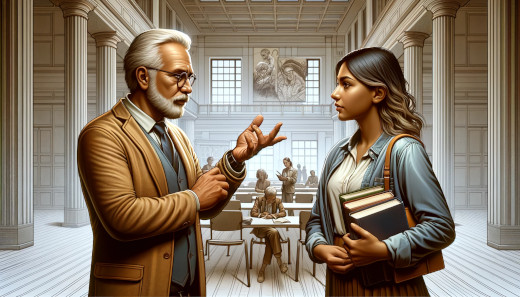
A.I.-generated image by DALL-E of a mentor mentee discussion
Last fall I took a non-credit certificate course through the University of Wisconsin – Green Bay on mentoring. Why did I do this? Long time readers of this humble blog may vaguely recall me writing in the past pessimistically on the lack of mentorship in the technology field and the fact that I did not have a formal mentor at that time.
Where I’ve had many informal mentors that have been valuable to me throughout my life and career, I have never been in a formal mentor/mentee relationship. That being said, I’ve been told by many people specifically that I have been a mentor to them. In those cases it was not in a formal mentor/mentee relationship nor was I necessarily seeking that with them. Through all of this I knew there was more to mentoring and this was the catalyst for me taking the certificate course.
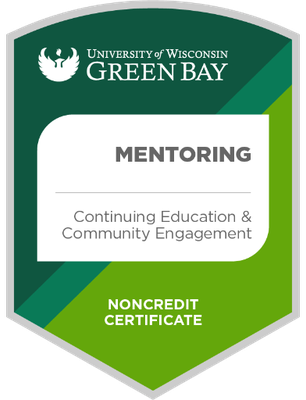
My greatest takeaway from the course was learning the optimal structure of a mentoring relationship between the mentor and the mentee. From the goals of both the mentee and mentor (yes, the mentor should gain much from this too!) to a formal mentoring agreement to the cadence and format of meetings the course gave me a true 360 degree understanding of mentoring. The course was organized into 3, 2-hour virtual sessions, with some attendees being local to northeast Wisconsin and others from around the US. There were guest speakers in each session sharing their experience on topics from process to ethics. Each session had pre-work including articles and exercises which lent to a great overall learning experience. I left with the tools to properly initiate and sustain a mentoring relationship. There was no exam at the end, however upon completion I was awarded a certificate suitable for framing and the following verifiable digital badge – click the badge below to see for yourself.
Now What?
So what do I do this? Of course I’ve added the digital badge to my LinkedIn profile, the About page here at The Hot Iron and my resume. My employer has no formal mentorship program so it is nothing I will be officially applying there but will continue to informally mentor staff and colleagues. There are mentor programs out there – for example, UW-Green Bay has one and is seeking volunteer mentors – however with my current schedule I decided not to pursue it, yet. Where I haven’t looked into mentoring programs a little closer to home (I prefer to meet people face-to-face whenever possible) that will be the path I will likely take to get into formal mentoring.
I decided to pay for this course myself, and at around $300 it was good value for the return. More information on the course is available on the UW-Green Bay Web site. As of writing this there is not a date listed for a future offering, however I’d recommend contacting them as I did to be in the know when another is scheduled. And feel free to tell them that I sent you.
Deconstructing Mentoring Education
Anything worth doing is worth doing well. As I felt this way about mentoring, I took this certificate course to get the tools and right mindset should the opportunity present itself, either as a mentor or a mentee. It was an enjoyable experience that has inspired me, at the right time, to pursue an activity I feel I will be good at.
This is from The Hot Iron, a journal on business and technology by Mike Maddaloni.
Did you enjoy this? Subscribe to The Hot Iron by RSS/XML feed or Read by Email
Announcements • Business • Thrive • (0) Comments • PermalinkSubscribe to The Hot Iron



The Hot Iron strives to present unique content and point-of-view on business, technology and other topics by Mike Maddaloni, a technology strategist based in Appleton, Wisconsin.
Photo credit: Logan Connor/Oomphotography
Follow Mike on Mastodon.
Value for Value
If you like what you are reading on The Hot Iron, buy me a coffee!
About Links
In posts here at The Hot Iron there are often links and banner ads for products and services. For some of these links and banner ads, I receive compensation if you click and/or eventually buy said products or services. Where most links are marked as such, it is safe to assume any link or banner ad is a compensated one.